

Online casino gaming continues to grow in Malaysia, and many players are searching for simple, fast platforms to get started. If you are planning to join MBI8, this complete guide will walk you through everything from registration to placing your first bet.
In this article, you will learn:
- What you need before registering
- How to complete SMS registration correctly
- Important details about full name & bank matching
- How to verify your account via SMS
- What to do after registration
- How to deposit and start playing
- Common mistakes to avoid
- Responsible gaming tips for Malaysian players
Let’s begin.
What Is MBI8?
MBI8 is an online casino platform offering:
- Slot games
- Live casino (Baccarat, Roulette, Blackjack)
- Sports betting
- Electronic games
The platform is mobile-friendly and designed for easy registration using SMS verification. One important point: No extra identity document upload is required during registration — only SMS phone verification is needed.
This makes the sign-up process fast and convenient for Malaysian players.
What You Need Before Registering
Before visiting the registration page, prepare the following:
1. Valid Full Name (Important!)
Your full name must match your bank account name exactly.
Why is this important?
Because when you deposit or withdraw money later, the system checks that the bank account holder name matches your registered name. If it does not match:
- Your withdrawal may be delayed
- Your transaction may be rejected
Example:
If your bank account name is:
MUHAMMAD ALI BIN ABU
You must enter the same format when registering.
Do not use nickname or short name.
2. Active Malaysian Mobile Number
You must use a phone number that:
- Can receive SMS
- Is active
- Has network coverage
This is required to receive your OTP (One-Time Password).
3. Secure Password
MBI8 requires 6–20 characters.
For better security, use:
- Uppercase + lowercase letters
- Numbers
- Avoid simple passwords like 123456
Example of stronger password:
MyGame88Secure
Never share your password with anyone.
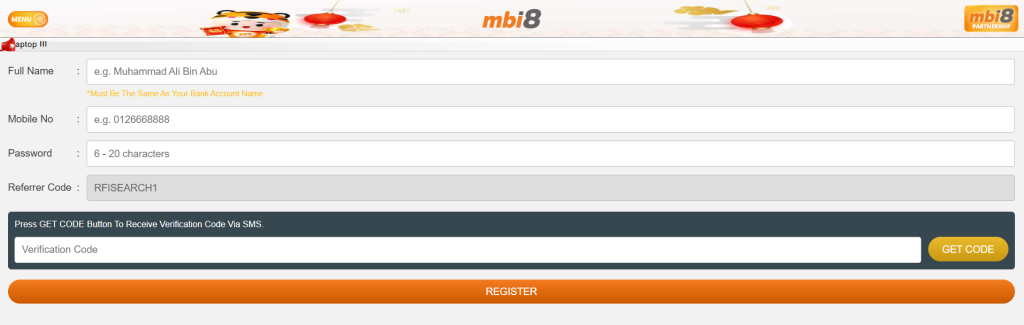
Step-by-Step Guide: How to Register in MBI8
Now let’s go through the actual registration process based on the SMS registration form.
Step 1: Visit the Official Registration Page
Go to the official registration page of MBI8.
Make sure:
- You are on the correct website
- The page loads fully
- You are not using suspicious third-party links
For safety, bookmark the official page after visiting.
Step 2: Enter Your Full Name
You will see a field labeled:
Full Name
Enter your name exactly as it appears in your bank account.
⚠ Important Reminder:
Must be the same as your bank account name.
Do not:
- Add symbols
- Use nickname
- Use different spelling
Accuracy here prevents future withdrawal problems.
Step 3: Enter Your Mobile Number
In the “Mobile No” field:
- Enter your Malaysian phone number
- Example format: 0123456789
- Do not include +60 unless specified
Make sure there are no typing errors.
Step 4: Create Your Password
In the password field:
- Must be 6–20 characters
- Avoid using easy combinations
Security Tip:
Do not reuse passwords from:
- Banking apps
Keep your gaming account separate for safety.
Step 5: Enter Referrer Code
During registration, you will see a field labeled “Referrer Code.”
If you were introduced to MBI8 through a trusted source, you can enter a referral code here. For readers of this guide, you may use:
RFISEARCH1
Entering a valid referrer code during sign-up may provide additional promotional eligibility or future benefits, depending on the platform’s current campaign.
Once entered, proceed to request your SMS verification code.
Step 6: Get SMS Verification Code
Below the form, you will see: “Press GET CODE Button To Receive Verification Code Via SMS”
Click GET CODE. Within seconds, you should receive an SMS containing your OTP code.
Enter the verification code into the “Verification Code” field.
If you do not receive SMS:
- Check signal
- Wait 1–2 minutes
- Click resend
Step 7: Click Register
Once all fields are filled correctly, click REGISTER. If all information is valid, your account will be created instantly. Registration usually takes less than 3 minutes.
Common Registration Mistakes (And How to Avoid Them)
| Common Registration Mistakes | How to Avoid / Solution |
|---|---|
| Incorrect personal information (e.g., wrong name, email, or phone number) | Double-check all details before submitting. Use autofill carefully and verify your inputs. |
| Weak or insecure password | Create a strong password using a mix of letters, numbers, and symbols. Avoid common passwords. Consider using a password manager. |
| Skipping required fields | Ensure all mandatory fields are filled. Many registration forms highlight required fields with asterisks (*). |
| Not reading terms and conditions | Take a moment to read T&Cs to avoid future issues like account suspension or missing bonus eligibility. |
| Using unsupported browser or outdated version | Use the latest version of popular browsers (Chrome, Firefox, Edge). Ensure cookies and JavaScript are enabled. |
| Duplicate accounts | Check if you already have an account before registering again. Duplicate accounts can lead to account restrictions. |
| Not receiving SMS verification code (OTP) | 1. Check your mobile signal — make sure your phone can receive SMS. 2. Wait 1–2 minutes — sometimes SMS may be delayed. 3. Click the Resend Code button if needed. 4. Ensure you entered the correct Malaysian mobile number (Example: 0123456789). 5. Avoid using third-party apps or virtual numbers — only active Malaysian numbers are supported. 6. If still not received, restart your phone or try another network. |
| Providing invalid payment information | Verify your payment details before submission. Use supported payment methods to avoid registration or withdrawal issues. |
Common FAQ – Registration & Playing on MBI8
Q1: Do I need an email address to register on MBI8?
No. Registration only requires your full name, Malaysian mobile number, password, referrer code (optional), and SMS verification code. There is no email required in the SMS registration form.
Q2: What should I do if I don’t receive the SMS verification code (OTP)?
Make sure your phone number is correct and your device has signal. Wait 1–2 minutes. SMS can be delayed. If still not received, click “Resend Code,” restart your phone, or try again with a strong network signal.
Q3: Can I change my mobile number after I register?
Usually, to update your registered mobile number you’ll need to contact MBI8 customer support and request a change. They can guide you through the correct process if needed.
Q4: What happens if my full name doesn’t match my bank account?
If the name you registered doesn’t match the name on your bank account, you may face problems when withdrawing funds later. Always enter your name exactly as shown in your bank records to avoid delays or rejection of transactions.
Q5: Is registration free and how long does it take?
Yes. Registration is free and typically takes only a few minutes using the SMS form. Once your details and OTP are correct, your account will be created immediately.
Q6: How do I reset my password if I forget it?
You can use the “Forgot Password” option on the login page, request an SMS reset code, and create a new password. Always make sure your mobile number is active to receive the reset SMS.
Q7: Can I use MBI8 on my smartphone?
Yes. The platform is fully mobile‑friendly. You can register, deposit, place bets, and play games on your phone browser without downloading an app.